
Certu WMS
Know where every pallet is, every minute. A warehouse system simple enough for every person on your team, that runs your warehouse or works with the one you have.

The everyday problems a warehouse system solves
Every growing warehouse runs into them. Certu WMS answers each one.
Where is it?
Someone walks the aisles to find a pallet.
The numbers don't match
The spreadsheet says 40 cases; the shelf has 32.
The wrong product shipped
The customer finds the mistake before you do.
Stock expired on the shelf
Old stock hides at the back until it can no longer be sold.
Only one person knows
When the most experienced person is away, work slows down.
Paper everywhere
Forms are filled in by hand, then typed in again later.
The journey of one pallet
Every move is scanned, so the screen always matches the floor, spot by spot. One pallet, six steps, from the truck that brings it to the truck that takes it away.
Check the truck against what you ordered
The system already has the delivery list before the truck arrives. Each pallet scanned off the truck ticks off its line.
- Shortages caught at the door, not weeks later
- Nothing extra comes in without a manager's OK
- No paper checklist to type in later
Every pallet gets its own barcode
Like a licence plate, the label makes each pallet unique. One scan shows product, quantity, batch and expiry date.
- Pallets are never mixed up
- Batch and expiry always known
- Labels print from the office screen
The system picks the best free spot
You set storage rules by product, product type or export goods. The system picks a free shelf that fits; the driver scans it to confirm.
- Each kind of product goes to its own area
- Full shelves are skipped automatically
- New drivers work like experienced ones
The stock that expires first leaves first
For each product in an order, the system takes the pallets that expire first, or that arrived first. You set the rule per warehouse or per picking run.
- Less stock expires on the shelf
- Fresher products for your customers
- Stock on hold is never picked
The right pallet on the right truck
Every pallet is scanned at the truck. A pallet that belongs to another order is refused on the spot.
- No wrong deliveries leave your dock
- Stock updates the moment loading ends
- Truck checks and seal numbers on record
A little every day, without closing the warehouse
Each day the system asks someone to count a few spots. The counter does not see the expected number, so counts stay honest.
- No need to close the warehouse to count
- Small mistakes fixed before they grow
- Big differences need a manager's approval
Damaged or doubtful goods are set aside, never shipped
Stock that is damaged, returned or waiting for a quality check stays in the system, but no order can take it until a manager releases it.
Damaged goods never reach a customer
Stock set aside cannot be picked, loaded or shipped.
A clear decision on returns
Each return is checked and goes back to stock, to repair or to write-off.
Anyone on the floor can report a problem
Problems go straight to the office screen, where a manager can act on them.
Simple on the floor, clear in the office
No technical background needed. Each person sees only what they need to do the job.
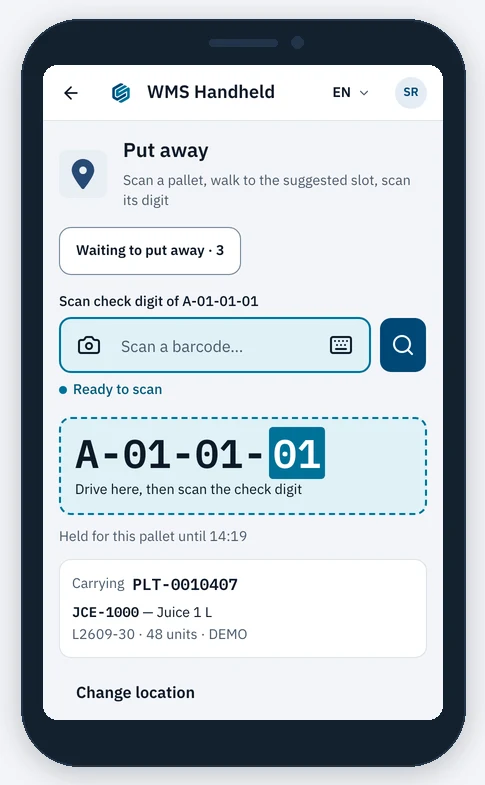
On the warehouse floor
- One job on the screen at a time
- Large text and buttons, easy to use on the move
- Each step confirmed with one scan
- Rugged barcode scanner or a phone's camera
- Sign in with a staff badge and a PIN
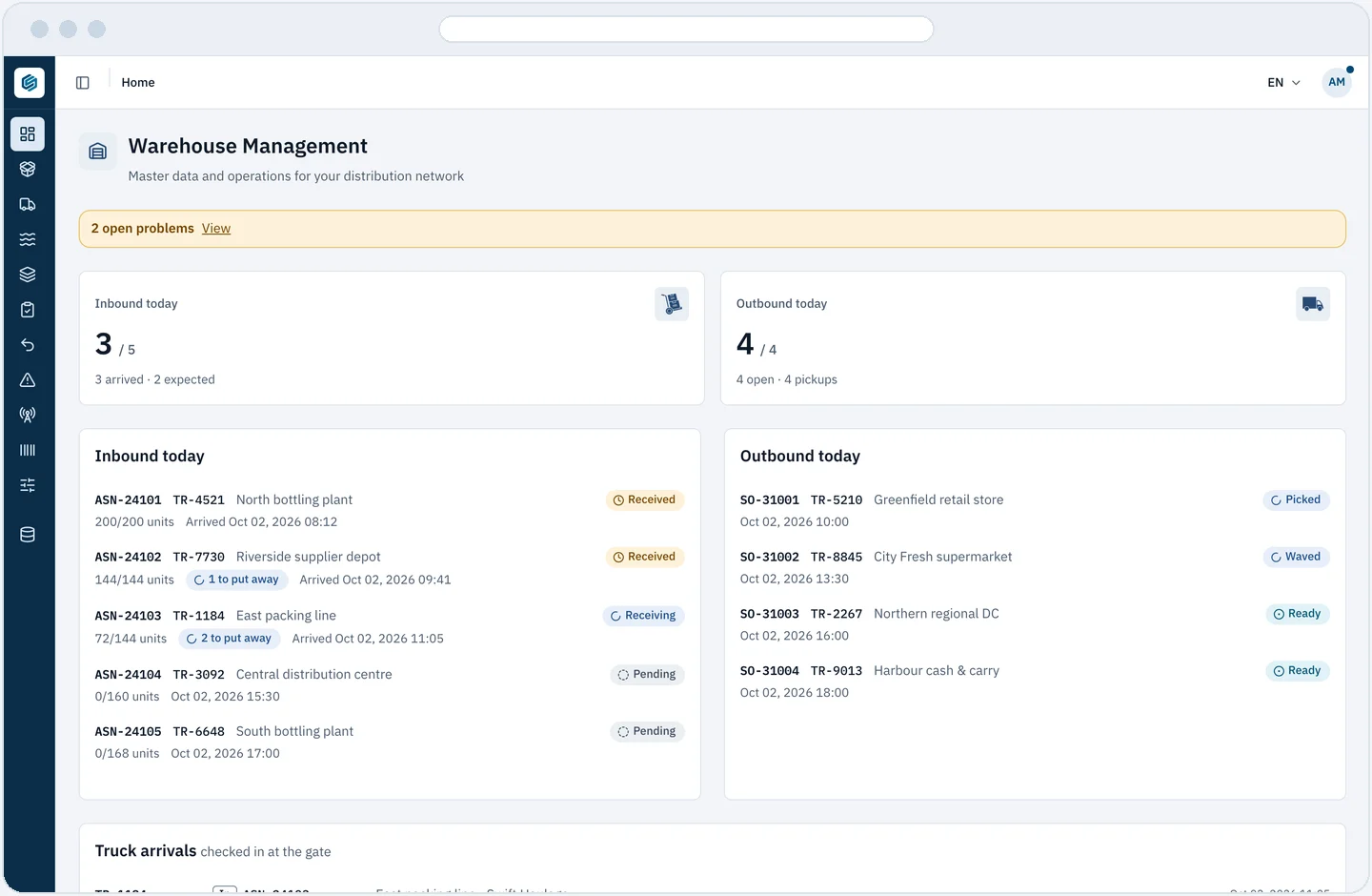
In the office: today's work on one screen
- Trucks arriving and orders shipping today
- Open problems reported from the floor
- Stock by spot, product and batch, with full history
- Print pallet labels, pick lists and count sheets
Every action is recorded: who did it, when, and why. Each person can be limited to the warehouses they work in. Screens shown with demo data.
From paper and memory to one shared screen
Today, without a system
- Stock lives in spreadsheets and memory
- Finding a pallet means walking the aisles
- Mistakes show up when the customer calls
- Counting means closing the warehouse
With Certu WMS
- Every pallet has a label and a known spot
- Anyone can look it up in seconds
- The right goods reach the right customer
- A few spots are counted every day
How we set it up together
The plan is agreed after we walk your warehouse with you.
Map your warehouse
Areas, aisles and shelves. Every spot gets a label.
Load your products
Your product list, imported from a spreadsheet.
Set your rules
Where things are stored, and which stock leaves first.
Train your team
Handhelds on the floor, screens in the office.
Go live
Start receiving with the system, with us beside you.
Starts simple, grows with you
Works on its own, or with what you run
No other system is needed to start. Shipments and truck plans come in from Certu LOaaS, and receipts, shipments and counts go out to your accounting or other systems through an open API.
Your warehouse, your rules
Settings per warehouse, and features switched on as you need them. Partner product codes are matched to yours, and every message is tracked until confirmed.
More warehouses as you grow
Add warehouses to the same system, and several stock owners can share one building. Already have a WMS? Keep it: Certu reads stock levels and pick status from it.
Works with the rest of Certu
Every solution reads from the same data and is watched by Certu Intelligence. Start with one, add the others when you are ready.
Try Certu on your own orders.
Request a Shadow Simulation on your historical data and see the difference in cost and service before you commit.